

Introduction
You uploaded a product photo, it looked sharp on your phone, and then it appeared blurry and soft the moment it went live in your store. Or maybe you found the perfect old family picture, only to realize it was too grainy and low-resolution to print. Moments like these are exactly why an AI image enhancer has become one of the most useful tools a creator can have. Instead of spending hours in complex editing software, you can enhance an image with AI in seconds — turning low-quality, pixelated, or dull photos into crisp, professional-looking images with a single click. What used to require a trained retoucher and expensive software now takes a few seconds in your browser, and often costs nothing at all.
In this guide, you'll learn exactly what these tools do, how the technology behind them actually works, how to use one step by step, and how to choose between the free and paid options on the market. Whether you're an eCommerce seller, a photographer, a marketer, or a student, by the end you'll know how to turn almost any weak image into something worth publishing.
What Is an AI Image Enhancer?
An AI image enhancer is a tool that uses machine learning to automatically improve photo quality — increasing resolution, sharpening details, reducing noise, and correcting color. Unlike manual editing, it analyzes an image and predicts missing detail, delivering clearer, higher-quality results in seconds with no editing skills required.
That single sentence captures the appeal, but it's worth unpacking what makes this different from a traditional photo editor. When you use a classic tool like Photoshop or GIMP, you make every decision: you drag sliders, mask areas, and manually paint in detail. The results depend entirely on your skill and patience. An AI-powered image enhancer flips that model. It has been trained on millions of images, so it already “knows” what a sharp eyelash, a clean product edge, or a smooth gradient sky is supposed to look like. When you feed it a flawed photo, it reconstructs the missing information based on those learned patterns.
Because of this, these tools go by many names — you'll see them called an AI image quality enhancer, an AI powered image enhancer, or simply an image enhancer AI. Whatever the label, the promise is the same: consistent, high-quality AI image enhancement without the manual labor. This is what makes the technology so accessible to people who aren't trained designers, from students cleaning up a screenshot for a presentation to small business owners polishing their catalog.
How Does AI Image Enhancement Work?
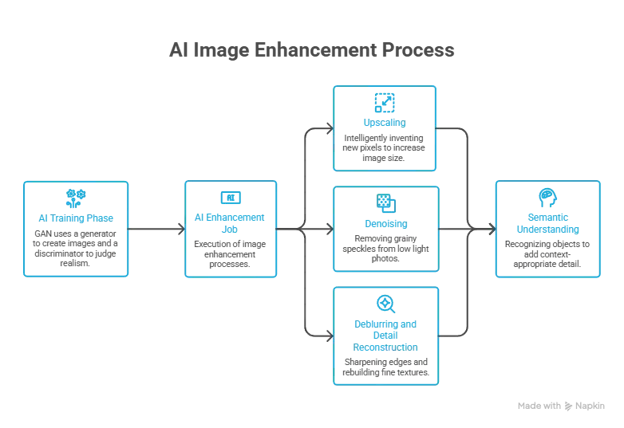
Understanding what happens under the hood helps you get better results and set realistic expectations. At the core of most modern tools is a type of AI called a neural network — often a Generative Adversarial Network, or GAN. A GAN is actually two networks working against each other: one “generator” tries to create an improved version of your image, and one “discriminator” judges whether the result looks real. Through millions of rounds of this back-and-forth during training, the generator gets extraordinarily good at producing detail that looks natural to the human eye.
When you run an AI image enhanced job, several distinct processes usually happen at once. The first is upscaling, also called super-resolution. Rather than simply stretching pixels and creating a blurry mess (the way old resizing tools did), the AI intelligently invents new, plausible pixels to fill the gaps — so a small image can grow to two, four, or even eight times its original size while staying sharp. The second is denoising, which removes the grainy speckles common in photos shot in low light or at high ISO. The third is deblurring and detail reconstruction, where the model sharpens soft edges and rebuilds fine textures like hair, fabric, and foliage.
The best way to think about it is that the AI “imagines” realistic detail based on everything it has seen before. In our own testing, a 500-pixel-wide product image upscaled cleanly to 2,000 pixels while keeping crisp edges around the object and a smooth, artifact-free background — a result that would have taken significant manual retouching to achieve by hand. That reliability is precisely why AI image enhancement has moved from a niche curiosity to a standard part of many creative workflows.
It also helps to understand why this beats the old way of enlarging photos. Traditional resizing uses interpolation, a purely mathematical process that averages neighboring pixels to guess what new ones should look like. Because it has no understanding of what's actually in the image, it produces soft, muddy results — the classic “blown-up and blurry” look. An AI powered image enhancer, by contrast, recognizes objects and textures. It knows the difference between a strand of hair and a background blur, so it can add sharp, context-appropriate detail instead of a fuzzy average. This semantic understanding is the single biggest reason AI results look so much more convincing than anything a resize slider could ever produce.
Upscaling vs. Sharpening vs. Denoising
It's easy to lump these together, but they solve different problems. Upscaling increases the total pixel dimensions of an image — use it when a photo is too small. Sharpening enhances edge contrast to make an image look crisper — use it when a photo is the right size but looks soft. Denoising removes grain and color speckling — use it when a photo looks grainy or noisy, typically from low-light conditions. A good AI tool applies the right mix automatically, but knowing the distinction helps you choose the correct mode when you have manual control.
How to Enhance Images Using AI (Step-by-Step)
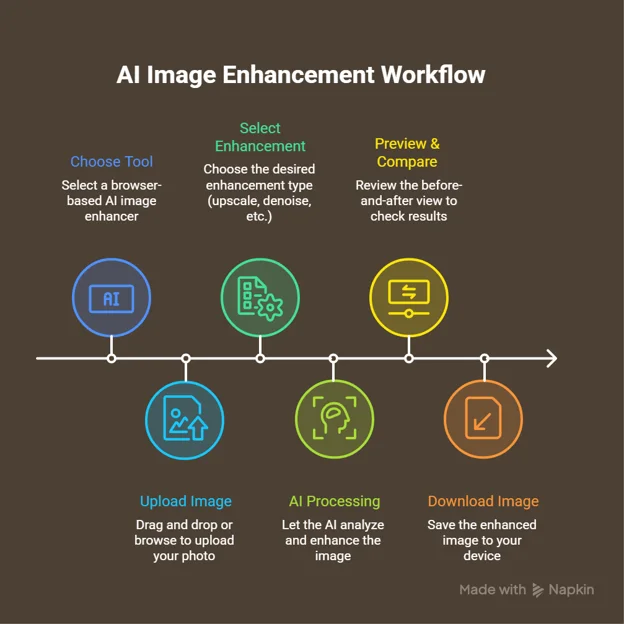
One of the biggest advantages of these tools is how little you need to know to use them. Here's the complete process for how to enhance images using AI tools, from upload to download:
- Choose an AI image enhancer. Browser-based tools like Toolspy require no download or installation — you simply open the site and start working, which is ideal if you're on a work computer or a Chromebook.
- Upload your image. Most enhancers accept common formats such as JPG, PNG, and WebP. Drag and drop your file or click to browse.
- Select your enhancement type. Decide whether you want to upscale, denoise, sharpen, restore an old photo, or apply a general one-click enhancement.
- Let the AI process the image. This usually takes a few seconds. The tool analyzes the photo and applies its model.
- Preview and compare. Use the before-and-after view to confirm the result looks natural and not over-processed.
- Download your enhanced image. Choose your output resolution and save the finished file to your device.
That's the entire workflow. No layers, no masking, no slider gymnastics — which is exactly why this approach has become so popular with people who need great images but don't have design training.
Key Features to Look For in an AI Image Enhancer
Not all enhancers are created equal, and the free label can hide important limitations. When you're evaluating your options, watch for these features:

- Watermark-free output. Many “free” tools stamp a watermark on your result unless you pay. If you're using images commercially, this is a dealbreaker.
- Resolution and file-size caps. Some free tiers limit how large your output can be or how big a file you can upload. Check the ceiling before you commit.
- Batch processing. If you're an eCommerce seller with 100+ product shots, the ability to enhance many images at once saves enormous time.
- Format support. Look for JPG, PNG, and WebP at minimum; TIFF support is a bonus for photographers.
- Face and detail enhancement. Dedicated models for faces produce far better portrait results than a generic upscaler.
- Processing speed. A tool that takes 30 seconds per image will frustrate you at scale.
- Privacy and security. Check whether uploaded images are deleted after processing, especially for sensitive or client work.
The reason this matters is that a genuinely useful ai image enhancer free tier should let you accomplish real work without hitting a wall on the third image. Free AI image enhancement is only valuable if the free version is actually usable — so read the fine print before you rely on any single tool.
Best AI Image Enhancers Compared (Free & Paid)
To recommend tools fairly, we evaluated each on four criteria: output quality, processing speed, free-tier generosity, and ease of use. The goal isn't to crown a single winner but to help you match a tool to your needs. Here's how a representative set of the best AI image enhancers compares:
| Tool | Best For | Free Tier | Key Limitation |
|---|---|---|---|
| Toolspy | Quick browser-based enhancement | Generous, no install needed | Fewer advanced manual controls |
| Tool A | Portrait and face restoration | Limited monthly credits | Watermarks on free plan |
| Tool B | High-volume batch upscaling | Small free allowance | Slower on large files |
| Tool C | Photographers needing max resolution | Trial only | Paid-first pricing |
| Tool D | Casual social media edits | Free with ads | Lower output resolution |
When choosing the best AI for image enhancement, think about your actual use case rather than raw feature counts. A social media creator posting a few images a week has very different needs from a marketing agency processing hundreds of client photos. If speed and zero friction matter most to you, a browser-based online AI image enhancer that works without any installation or steep learning curve is usually the right call. If you prefer a browser add-on instead, some services also offer an AI image enhancer free extension so you can enhance images without ever leaving the tab you're working in.
Free vs. Paid — Which Do You Actually Need?
This is the question most people wrestle with, so let's be honest about it. A free AI image enhancer is more than enough when your needs are occasional: cleaning up a photo for a blog post, sharpening a social media graphic, or upscaling the odd product shot. Modern free tiers are genuinely capable, and for many users an ai image enhancer online free will cover everything they need without ever paying a cent.
Paid plans start to make sense when volume, resolution, or commercial stakes rise. If you're enhancing hundreds of images a month, need the absolute maximum output resolution for large-format printing, or require guaranteed watermark-free results for client deliverables, a subscription pays for itself quickly. The smart move is to start with an ai enhance image free option, test it against your real work, and only upgrade once you've hit a genuine limitation. There's no reason to pay before you've confirmed the free version can't do the job.
Who Uses AI Image Enhancers? (Use Cases by Audience)
The reason these tools have spread so widely is that the same core technology solves very different problems for very different people. Here's how various groups put an AI enhance image workflow to use:
- eCommerce sellers. Sharper, brighter product photos directly influence conversions. A clear image builds buyer confidence, reduces returns, and helps listings stand out in crowded marketplaces. Batch enhancement makes updating an entire catalog realistic.
- Photographers. Even skilled shooters end up with soft, underexposed, or noisy frames. An image enhancer AI can rescue an otherwise unusable shot, upscale images for large prints, and speed up culling by salvaging near-misses.
- Social media and content creators. Every platform has its own resolution and quality expectations. Enhancing images before posting ensures your content looks crisp on high-density displays instead of soft and amateurish.
- Digital marketers and agencies. Producing professional visuals without a dedicated designer for every task keeps campaigns moving. Enhanced stock photos and screenshots look far more polished in ads and landing pages.
- Small business owners. Not everyone can hire a photographer. AI enhancement lets a solo operator produce visuals that look professionally shot, leveling the playing field against bigger competitors.
- Students and bloggers. Cleaning up screenshots, free-stock images, or older photos for reports, presentations, and articles is fast and free — no design budget required.
Seeing your own situation on this list is usually the moment the value clicks. Whatever you create, cleaner images make your work look more credible.
Tips to Get the Best Results From AI Enhancement
A few practical habits, learned from hands-on use, will noticeably improve your results:
Start with the highest-quality source you have. AI can reconstruct a surprising amount of detail, but it works best when it has something to build on — a slightly soft photo enhances better than a tiny, heavily compressed thumbnail. Avoid over-upscaling extremely small images; pushing a 100-pixel image to 4,000 pixels invites artifacts and an artificial look. Match the enhancement mode to the actual problem: use denoising for grain, sharpening for softness, and upscaling for size, rather than blindly applying maximum settings to everything.
Finally, always compare before and after. Browser tools like Toolspy let you preview the result side by side before you download, so you can catch any over-processing — that plasticky, too-smooth look — and dial it back. An online AI image enhancer free preview is your best defense against results that look unnatural. When an AI image enhances a free online workflow gives you a live comparison, use it every single time.
It also pays to pick the right output format for the job. Use PNG when you need transparency or the crispest possible detail, and JPG when file size matters more than perfection — for example, on a fast-loading web page. If your enhancer offers WebP, it often gives you the best balance of quality and small file size for online use. Getting the format right at export means your beautifully enhanced image actually looks its best wherever you place it, rather than being undone by heavy compression at the final step.
Frequently Asked Questions
What is an AI image enhancer?
It's a software tool that uses artificial intelligence to automatically improve a photo's quality — raising its resolution, sharpening details, removing noise, and correcting color. It delivers professional-looking results in seconds without requiring any editing skills.
Is there a truly free AI image enhancer?
Yes. Many tools offer genuinely useful free tiers. Toolspy, for example, lets you enhance images directly in your browser with no installation, making it a strong choice if you want quality results without paying. Just check each tool's caps on resolution and watermarks.
How do I enhance an image with AI?
Choose a tool, upload your image, select an enhancement type (upscale, denoise, sharpen, or restore), let the AI process it, preview the before-and-after, then download the result. The whole process usually takes under a minute.
Can AI improve blurry or low-resolution photos?
Yes. Using super-resolution, AI can add plausible new detail to enlarge small images and sharpen soft ones. Results are best when the original has some detail to work with rather than being extremely tiny or heavily compressed.
Does AI enhancement reduce image quality?
No, when used correctly it improves quality. Problems only appear if you push settings too aggressively — for example, upscaling a tiny image many times over — which can introduce artificial-looking artifacts. Moderate, appropriate settings keep results natural.
What image formats are supported?
Most AI image enhancers support the common formats: JPG, PNG, and WebP. Some tools also handle TIFF and other formats, which is useful for photographers working with higher-quality source files.
Is it safe to upload my photos to online AI enhancers?
It depends on the provider. Reputable tools delete uploaded images after processing and state so in their privacy policy. For sensitive or client work, always review the tool's data-handling policy before uploading.
What's the best AI image enhancer for eCommerce?
Look for one with batch processing and watermark-free output, since sellers typically enhance many product images at once. Clean, consistent, high-resolution photos improve buyer confidence and can directly boost conversions.
Can I use an AI image enhancer online without downloading software?
Yes. Many enhancers run entirely in your web browser, so there's nothing to install. This is convenient on work computers, Chromebooks, or any device where you can't or don't want to install applications.
How much can AI upscale an image?
Most tools offer 2x to 8x upscaling. Lower multiples produce the cleanest, most reliable results; pushing to the maximum on a very small image increases the risk of visible artifacts and an unnatural appearance.
Is there an AI image enhancer free extension for Chrome?
Yes. ToolSpy offers a free AI Image Enhancer Chrome extension that lets you enhance image quality directly from your browser without switching tabs. It's ideal for quickly improving blurry or low-quality images while browsing. For advanced features, such as higher-resolution outputs and additional editing options, you can also use the full ToolSpy web app.
Does AI image enhancement work on old or damaged photos?
Yes. Many enhancers include restoration features that repair scratches, reduce grain, and sharpen faded detail. Some even add colorization, bringing old black-and-white photographs to life with realistic tones.
Conclusion
Whether you're rescuing a treasured old photo, polishing a product catalog, or just making your social posts look sharper, an AI image enhancer removes the technical barrier that used to stand between ordinary users and professional-quality images. Start with a free tool, test it on your real work, and upgrade only if you hit a genuine limit — you may find the free version does everything you need.
Disclaimer: AI enhancement invents plausible detail based on learned patterns. Results vary with source quality. Enhanced images are for creative and commercial use at your own judgment — they are not guaranteed to restore historically accurate detail.